Tuesday, January 10, 2012

Enable Bluetooth Windows 7 Driver

Enable the bluetooth windows 7 driver to listen to music without wires.

Being impressed by the aspect of being able hear music without having the bothersome tangles, I've found a way to do it using Windows 7.

If your laptop doesn't have Bluetooth streaming, like my on my Dell Latitude D530 pairing with Motorola S10-HD Bluetooth Stereo Headphones set in Windows 7 RC. 


Before I start here is the different version of Windows that Supports* the A2DP 

Windows XP: Won't on it's own support A2DP, but they make Bluetooth USB  adapters which have drivers that support A2DP.

Windows Vista: Won't on it's own support A2DP, but you can add a A2DP profile without switching Microsoft’s stack. Service Pack 2 comes with bluetooth 2.0 


Windows 7: RC does not have a Bluetooth driver (but comes with A2DP) 

Use a Medialink - USB Bluetooth Adapter - Windows 7 Compatible
on your laptop. 


I’ve also bought the ARCTIC Sound Headphones to use the A2DP music stream.

Step 1 insert in the Bluetooth Windows 7 dongle if your laptop does not include Bluetooth

Now install the bluetooth windows 7 driver 

After the bluetooth adapter is inserted into the usb drive, Windows 7 will naturally slect the correct bluetooth driver. Now the bluetooth windows 7 driver is successfully installed.

Step 2
Goto the start menu and type “Bluetooth” to find the bluetooth set up.


Select for Add a Bluetooth device, also, have your Bluetooth headphone is on and fully charged. Windows 7 will search for avaiable bluetooth devices.

If you device is listed select it. You may have to enter a pass code, just type 0000 or referr to your bluetooth headset manual


Next match your bluetooth windows 7 driver to the headphones. 

Find control panel > Sound > Device &gt Bluetooth Devices
Choose your device and check the sound, select your headphones for the playback devcie.


Headphone Jack - Not Working on Laptop, Computer ( Windows 7 or Vista ), or iPod

If your headphone jack is not working on your laptop, computer (windows 7 or vista), or iPod it is not because of bad a headphone.

All these devices come with sound cards and one (or more) headphone jack.

When changing operating systems the drivers on the sound cards need to be up-to-date.

This can be done without bothering the local PC repair shop. Try these easy troubleshooting steps get sound out of your headphone jack.
-->

Systems troubleshooting

1 First, try a another music (VLC, Windows Music Player, QuickTime, or K-lite) player for your videos and mp3's. Incorrect codecs or a out dated media player could trigger the no sound from headphone jack issue.

2 Choose a another audio or mp3 file to experiment with the headphone jack sound. A bad file with corrupt files or the mixture of of some file types with some media player will be incompatible causing headphone jack audio problems.

3 Check that the headphone jack is turned on or the mute button isn't checked. Windows 7 and Vista operating systems use a icon that looks like a speaker in the bottom right corner. Open the sound controls by right clicking on the speaker icon and choosing volume mixer.
-->


4 Open the device maanger from the control panel and then click "sound controllers".

Open your sound card properites by clicking on device status. It should say the device is working properly.

If not, download updated drivers for your sound card from the manufactures website.


5 Once you have downloaded the new sound card driver, Open the Update drivers tab and click on have disk.

If you downloaded the driver to your hard drive, browse the C: drive. It will open the right driver file by itself. Don't click on any other driver files. You will then have to restart Windows.

6 Test your headphones for sound output. Your headphone jack sould now be working properly.

Headphone Fix - Wire Splicing

This is a simple headphone fix will save you the cost of replacing your high end headphones. 

It doesn't matter if you use your headphones to stroll around playing music so you don't disturb others near you or for their mobilty. 


You might use headphones every day or only from day to day. you will need this headphone fix to repair them when they've been damaged.

Dogs seem to enjoy chewing on your headphones that don't belong to them, so fix the damaged part of the headphone and continue to enjoy your music.


Things You'll Need
Electrical tape


Remove both sides of the exposed wire so there is a clean cut. 

Use a wirer stripper to remove one inch of the insulation around the electrical wire. 

Clap down on the wirer stripper handle and pull on the headphone wire. 

The wire insulation will come off cleanly, leaving the the exposed 2 colored wires. 

Reiterate this step with the opposite wire end.
Pull apart the two revealed wires, the red and green wires on both ends of the wire. 

Using the wirer stripper take off the wire insulation using leaving the exposed bar wire. 


Twist each end of the red wires together and cover with black electrical tape. Next to twist the green wires together.

Don't let the red and white wires come in contact with each other.

Monday, January 9, 2012

Fix Headphone: Wires and Plug

Learn how to fix headphone wires and plug to save some money. Headphone wires crack more frequently than than one would think .

These small bits of wire take a great deal of abuse, peculiarly if they are paired with today's mobile devices(mp3 players, iPods,iPads, iPhones and our active lifestyle.


Bouncing across town, tangling and crushing the headphone wire into small places, and then trying to find that perfect position to make both the left and right side headphones work together.

After makes for a discouraging and expensive trip back to the store to purchase yet another pair of headphones.

Take off the plug with your exact-o knife, or blade. Slice it off close to the plug. To fix headphone, you want as much wire as possible. 

Pull the headphone wires apart using a exact-o knife. Next peal back the wire insulation from the red and green wires. You need a 1/4 inch of bare wire exposed.

Place the tip of the headphone wire on the new headphone plug. You will be able to hear it through the headphone speaker.

Once the proper placement of the wires are located on the replacement plug, solder the wires. Do not use too much solder.

Test your fixed headphone for sound quality

Headphones For Work

When choosing headphones for work you need to consider many factors. 

In these days there are lots diversions in the work place. 

Many interruptions drive you away from the work and plans you're busy doing.

One of the biggest invaders to your work is noise interference.


Regardless of where you work, in a home business, a cafe, or a office cell, the noise near you is at all times forcing you to get off track on from your job.

Below you discover the best headphones for work. These are some of the highest rated noise cancelling headphones available and perform well in a work setting. Choose one of these headphones for work to silence the noise and let you get back to work.

Sennheiser MM 550 Travel Bluetooth Wireless Headset

Bluetooth wireless are the best headphones for work because they give you up to 30 feet to move around. You really don't want wires getting in the way while your working.
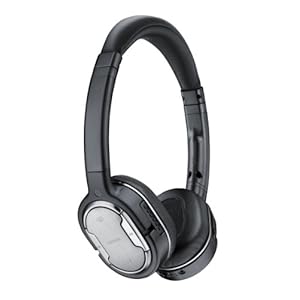
Nokia BH-905i Bluetooth Headphone

These noise canceling wireless headphones are great for the office. They work off bluetooth and can be paired to any bluetooth capable device.

Don't Have a Bluetooth device. read this (connect your Bluetooth headphone to any music device with a 3.5mm audio port)


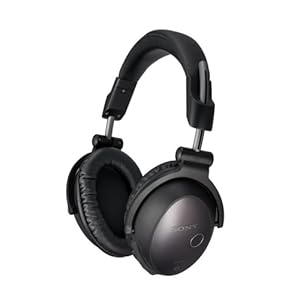
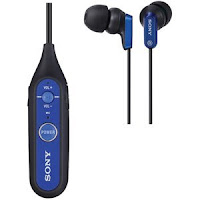
Sony DRBT50 Stereo Bluetooth Headset These Sony's will be great headphones for work. They block all outside noise so you can concentrate on your work.
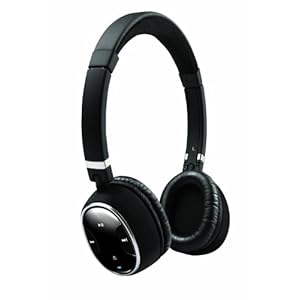

Creative Labs WP-300 Pure Wireless Bluetooth Headphones

Increase your productivity with these headphones for work. If you are budget conscious then these are the headphones to use for work. They also include a long lasting battery that keeps a charge up to 17 hours (hope you don't put that many hours in a day )


People Who Read This, Also Read:

Connect Two Sets of Bluetooth Earbuds Simultaneously


How To Make Custom Comfortable Earbuds


How To Make Wireless Earbuds


How To Fix Earbuds

Repair Earphones: Easy Fix

You can cheaply and easily repair earphones to save them from the recycle bin. 


The earphones wires break from repeated twisting and winding them, pull on them or yank them out of plug.


If you own a much loved set of earphones which aren't working properly, and for some reason have yet to throw them away, follow these instruction to quickly repair your earphones.

Luckily its possible to repair your earphones with some household items and a little time.


Things You will Need:

Exacto Knife
Black Electrical tape
Pair of scissors
Heat shrink
Pair of pliers
Soldering iron


Peal off the earphone wire insulation on the exposed part of the electrical wire with a exacto knife. Break up the 4 electric wires.


Cut off the materials inbetween the earphone wires with a pair of scissors. Unbend and straighten the electric wires with a pair of pliers.


Twine the red color wires together and then do the same for the green wires. Bind the wires together with heat shrink or black electrical tape.


Us your soldering iron to heat the heat shrink. Hold the heat shrink by your pair of pliers. This will protect the repair of earphone wires.


After the heat shrink has cooled down, test the repair by inserting you earphones into your music device. 

To Repair the earphone jack read
Headphones Plug - Replacement

Friday, January 6, 2012

Headphones Plug - Replacement

Replacing the headphones plug on a budget set of headphones is most likely not really worth the trouble.

However if you have spent a lot on a high-end set which without warning stopped working, you can consider switching the headphones plug to find out if that's the setback.

In many cases the headphone wiring connections will weaken from the plug over the years, so bonding the wires to a replacement headphone plug might make your headphones work again. Learn how to master a soldering iron prior to starting this endeavor.


Things You'll Need 

New headphone plug
pair of scissors or blade
Lighter
pair of pliers
Soldering iron
Black Electrical tape

Take off the old headphones plug at the end of the headphone wires.


Peal the electrical wire insolation off the headphone wires so there is about a 1/2 inch of bare wire exposed.

There will be a red wire, a green wire, and two bare copper wires.


Separate the red and green wires. Wrap both copper wires together and create one bare copper wire.

Using your lighter, put the end of each wire through the flame for a few seconds.


Take off the metal part your new headphones plug. Precisely wind the 3 wires into the bottom of your new headphones plug in order for the three wires come out the other end of the rubber boot.


Set the metal part of the headphones plug in your pliers to hang on to when soldering or affix the metal part of the headphones plug to a workspace to keep it secure.

Solder the headphone wires to the devices at the bottom of the metal part of the new headphones plug. Solder the one copper wire to the larger, outside connecting part.


Solder the green wire to the center connector. Solder the red wire to the end connector. Permit the new solder to cool off.

Take the metal part of the headphones plug out of the pliers or off the table. Tighten the headphones plug two pieces together.

Use black electrical tape to fasten the bottom of the headphones plug to the wires, check that there are not any exposed wiring.

Jawbone Pairing For Aliph, ERA, ICON, and Prime

Jawbone pairing is easily accomplished once you have the correct instructions for your individual Jawbone headset.

Jawbone makes upscale, Bluetooth acoustic headsets that are created to join up to your mobile phone, ipod or pc and disperse a premium audio sound.

If your mobile device does not come equipped with Bluetooth, you can still use your Jawbone with any audio device that has a 3.5mm audio port. Just get a Bluetooth Adapter and plug it into the audio port. Read make wireless earbuds to learn how.


As with any Bluetooth device, prior to connecting a Jawbone earphones to your phone, you need to start with a pairing operations that engages the Jawbone to pairing mode and finding it with your phone.

Jawbone carries several particular headsets; the current 3 models have a unique tactic of starting pairing mode.


Confirm what type of Jawbone headset you have, since the pairing instructions are particular for every model.

The Jawbone Era has a nose that is separated into 3 small sections, and the Jawbone Icon has 2 little parts. The Jambox is the exclusive Jawbone model that does not include a headset.

Set the Jawbone Era on pairing mode by turning the power knob, situated on the bottom of the headphone, to the "On" setting.

Next quickly move the headset up and down 4 times and the LED light will blink red and white, demonstrating that the headset is in pairing mode.

You can also, push and hold in the "Talk" switch, close to the rear of the headset, along with moving the power knob to on. Keep pressing the button til you see the LED blink red and white.


Set the Jawbone Icon on the pairing setting by pressing down the "Talk" switch, found on the back of your headphone.

Move the power switch on the bottom of the Icon to the "On" setting. While pressing the "Talk" switch until the LED light begins blinking red and white, signifying the headset is in pairing mode.

Put the Jawbone Aliph into pairing mode by moving the power switch to on, found on the other end of the headset, up and keep pressing it until the light on the button blinks red and white. The Aliph will say, "Aliph is in pairing mode."

Set the Jawbone Era on pairing mode by pressing down the button on the bottom of the headphone for at 3 seconds. Let go of the switch after the LED light starts blinking red and white.

Set the Jawbone Prime headset on pairing mode by pressing down the "NoiseAssassin" switch and the "Talk" switch together, found between the rounded face of the Prime, hold for three seconds. Let go of each switches after the LED light blinks red and white.

Thursday, January 5, 2012

What Are The Best Earbuds

Are you wondering what are the best earbuds ? You happens to be one like most individuals that twist bundles of earbuds around the home.

Spanning your peculiar audio contribution, you might have experimented with many kinds merely to be dissatisfied once more.


Because of earbuds, you cannot be joyous till you obtain this correct shape, sound and technology for the pursuits where you use them most. Of course, the best earbuds are available; just look and you'll discover the set that's suitable for you.


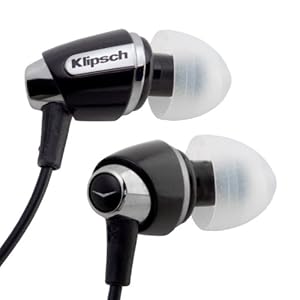
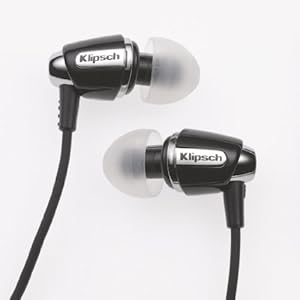
1-Zone out the outside society and get into your personal discreet performance journey whenever, anyplace with the Klipsch S4 earbuds.  

These noise isolating earbuds create vibrant sound and unique comfort for a cost that’s pain-free on the pocketbookFind Them Here on Amazon


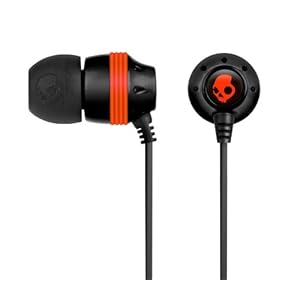
SkullCandy are the best earbuds because they have the best warranty. 

It is an top notch, no headaches warranty. Skullcandy will substitute them for any cause, anytime - simply go to their internet site, register your earbuds, and complete the warranty contact form. 


You will get CREDIT for their online store which you can buy on anything that you desire, and free shipping. 

The quanity of credit will rely upon the current amount of your earbuds on THEIR online store - thus for the ordinary INK'D earbuds, you will attain a $20 credit. 

They do not require any sort of proof of purchase, and it is not important how much time has gone by - just toss off the worn out earbuds into a little envelope and you're done. Find Them Here on Amazon

Earbuds Bass How To Increase

Improve your earbuds bass with a equalizer. Just about every person wants earbuds that have a speaker system sound. 

Sadly, we are usually left with cheesy, mono sounding earbuds. 


This marker earbud tone is born to the natural qualities of the audio speakers within the earbuds. 

These little size speakers discourages them from shifting sufficient air to create the grand sound waves necessary to replicate bass wavelengths. 

Using the an equalizer, conversely, you can manipulate the relative fullness of numerous frequencies within tracks, enabling you to raise the bass and prune the treble, moving you a slightly nearer to the sound you desire. Follow these instructions to increase the level of your earbuds bass.

Things You Need: 
Mobile Device with Equalizer
or


Step 1 -->

        Connect your earbuds into a audio system with an equalizer which is able to modify the bass levels, like a an mp3 player, a pc or mac or a high end audio system.
       
        Listen to a song on the device while hearing through your earbuds. Pay attention  to the low wavelengths and guitars, such as the bass, bass beat or the low part of a piano. This is termed as "listening down," as you are concentrating to the low volume spectrum of the track. Notice how booming or smooth these wavelengths are.


        Modify the equalizer following the song has completed playing. Amplify the bass frequencies (those below or at 100 Hertz) by dropping the controllers on the left part up, twisting the button marked "Bass" to the top, or raising the the bass amount on a digital device through the alteration keys provided. If these guides do not work with your equalizer, check guides in the user manual documented with your device.
       
        Listen to the song back once again, listening down. There ought to be a significant improvement in the fullness of the bass absolute frequency. Otherwise, resume to stop and modify the equalizer till you pick up on the sound you're wanting. 

Cute Earbuds for Cute Ears

Here is a large section of cute earbuds to make your ears more cute. They range from monkeys to alligators, and doggies and lady bugs, if you can think of it it can be made into an earbud.

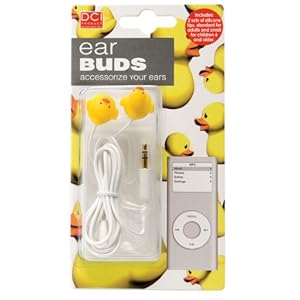
1- Duck cute earbuds are suitable with any mobile with a conventional 3.5 mm earphone plug - such as Ipod players, Smartphone, Handheld Gaming Systems and Notebook Computers. Earbud: 1" Find them here on Amazon


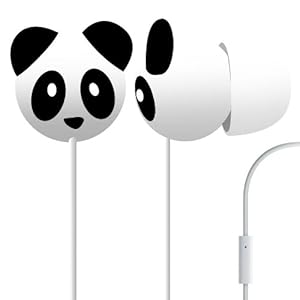
2 -Panda Cute earbuds, Distinctive character concept instead of the ordinary earphone hardshell, In ear shape offers more high quality music, Formed to fit well for simple and easy listening, Different character designs are available for sale for enthusiasts, Clear sound makes listening more wonderful.Find them here on Amazon


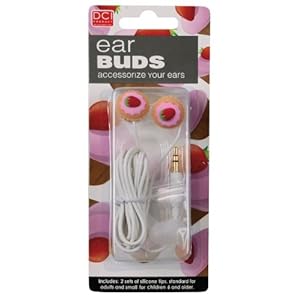
3 - Our spectacular Cupcake cute earbuds are the most succulent iPod accessories in the market! Enjoy the earphones with your handheld Cd Dvd player, Ipod player, notebook, ipod touch or handheld games console! The perfect girly gizmo when dancing to your treasured music, the Cupcake Earbuds make excellent hosiery fillers and Birthday gifts! Using a traditional 3.5 mm jack, our earphones will attach most mp3 devices. Plug your ears full of cake and your belly full of music! Not just are the Cupcake Earphones scrumptious to look at, they possess 2 sets of silicon tips so kids and adults can make full use of them! Go balmy with Flower Lawson, get low-down like Fanny Boondock and snap some Mrs. Beeton flows with these Cupcake Earphones!   Find them here on Amazon


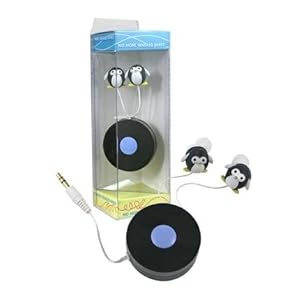
4 -Penguin These Furry friend cute Earbuds have press button retractable earbuds! That implies, no more twisted cords and tangles in your handbag or purse!Find them here on Amazon


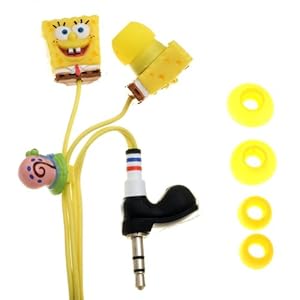
5 - iHip Nickelodeon SpongeBob 3D graven cute earbuds have a comfy shape in ear for high quality noise lowering and a shoe formed jack  Find them here on Amazon


Wednesday, January 4, 2012

50 cent headphones

50 cent headphones had abandon ship via Sleek Audio and will be creating his own type of headphones by a group he managed called SMS Audio. 50 cent headphones is one of the numerous audio Wares SMS Audio is delivering to everyone now. There are wired earphones, wireless earphones and earbuds.

Ensuring not to mistreat any other rapper - 50 cent headphones
appears to be the to start off pair of headphones to premier and it has a extraordinary freshness all its own. It consists of full on-board settings (volume control, bass amplify, and mute) and accomodates up to 4 fans to all at one time encounter the highest-caliber mobile sound from a solitary source.


50 cent headphones include a 40mm driver, 50″ of wireless spectrum, cushy memory foam speaker covers, passive noise cancellation, and expertly keyed digital eq.

50 cent headphones comes marketed with a wired microphone wire, 3.5mm wireless sender, hard-shell travelling bag, Micro USB charging lead, USB/AC adapter, airplane connect adaptor and a 1/4″ gold-plated adaptor.

Thats a bunch of gadgets to come included with a set of headphones, that I’m certain will come across with the pricing when it launch. The general construction of 50 cent headphones do appear kind of cumbersome and masculine yet somehow they come in white might give it a softer improvement.